Two girls and a Raspberry Pi

This blog is a little different than the ones I posted before. As the oldest daughter of my parents I’ve always felt responsible for my sisters, I try to inspire them to learn math, programming and other useful things. But they’re very young and that task is not always easy, because sometimes they feel more like playing or watching TV.

After I experienced Flipped learning in Ken’s class I got motivated and had an idea, I decided to take my Raspberry Pi and give it to my 14 year old sisters for a weekend, just to see what they could do with no instructions and a sensor kit.

Their first reaction was nice, they were happy and seemed motivated, Aby wanted to do a Theremin so they could play the Star Trek theme song, and Naty agreed with her.


They decided to use a Passive Buzzer and an Ultrasonic Sensor to make their Theremin, they were so excited they stayed up until late night learning C and how to use the sensors. They finished the next day with what they called an “Almost Theremin”.

They’re planning to do a better one, but they need another distance sensor and to know more about programming.

The video with the last version of their project is right below.


My Conclusions

I was impressed with the results, I expected them to drop out or lose focus on the project, but they did a great job and even made plans to make it better. So I am happy I realized that motivation is better than being strict and closed when it comes to learning. I want to try something similar with my youngest sister, or with the three of them, to see what else they can achieve.

Is Software Engineering really Engineering?

To be honest, I didn’t understand this question until I googled it and found out that there are many people who think Software Engineering should not be considered as Engineering but as a craft. I read a publication by Bill Curran, a guy who thinks that SE has a misnomer. Apparently, early practitioners of Software Engineering wanted to call it “Software Physics” but the term was already taken.

After reading some more posts and discovering that some of they had a point. I decided to first know more about Engineering itself, so I could find whether SE was Engineering or not.

I read some definitions and I found a video made by the Faculty of Engineering and Built Environment at the University of Newcastle. It explains in four minutes and in an easy to understand and enjoyable way. You can watch it bellow.

According to the IEEE computer society SE is “The application of a systematic, disciplined, quantifiable approach to the development, operation, and maintenance of software; that is, the application of engineering to software.”

So I think Software Engineers are truly Engineers. Programming may be itself a craft, but SE goes beyond that. Software Engineers think about solutions for a problem, they plan, sketch, study, implement, test, refine and maintain them.

Course Review

This is the first time I take a course with Ken, I have to say that I really like this kind of teaching. We as students are able to choose what we want to know, how much we want to know and when we want to learn it. And I think that learning should be like that, something enjoyable and not painful.

I studied eight years in a Montessori school, the method there was kind of the same as Ken’s Flipped Class method so I’m used to it. But I don’t think this is the right method for most people, especially because the other courses we’re taking are really demanding and not flexible, therefore time consuming. That is why some of us tend to put off all the assignments and activities.

I can say that I’ve learned a lot and I really liked the course and I feel like I complemented it with Ken’s Semanai course that I also took. I think this is the right way to learn and school should be like this.

But I didn’t like everything about it, I don’t think using social media, should be evaluated as part of our grades. I understand that it’s a powerful resource but I think is not fair. There are some people who is really introverted and find it hard to tweet or simply people that don’t have any questions or prefer to directly ask a classmate instead of tweeting his question. I like more being and learning alone, and it’s part of my personality but others’ opinion may differ from mine and that’s ok.

All I have left to say is; thanks Ken I learned a lot.

Software Testing

In this stage of the project we’ve already finished the implementation and we test it to make sure that it works. In class I learned that writing the test before writing the code is a good idea, this might give you a hint of how important Software Testing is.

I’ll explain the kinds of testing in an infographic so you’ll read them eve if you’re lazy because they have colors and not so much text.

Software Testing.png


There are several tools you can use in this stage of the project, the one that we used in class is JUnit, it’s easy to use and there are a lot of tutorials out there.

Software Maintenance

Software Maintenance is also a part of the Software Development Lifecycle and is as important as getting the project done because change is constant and we have to make sure that our software is always useful and not outdated.

It is known that this is the most expensive part of the project but is also a must if you want your code to be useful when the client changes its mind or the market takes a turn. To explain the kinds of Software Maintenance I made another infographic, you can see it below.

Types of software maintenance.png

To complement what you just read you can watch this video, It’s a bit long but I liked it and you might like it too, it explains pretty well what SM is.

The Future of Software Engineering

I cannot but marvel at humanity’s struggle to synthesize his natural ability to think. In our case to forge a tool capable of imitating thought processes at very complex levels.

In our effort to unravel the growing number of mysteries somehow programmed into everything that we encounter in this universe we have built a curiosity that somehow reflects reality in a light never before seen.

The advancement of physics and program engineering have opened a new threshold impossible to even imagine, Quantum theory applied to Computer Science and it’s respective programming needs are the new frontier, a door to an unimaginable fountain of discoveries.

Processing and memory chips so tiny and fast, working very near absolute 0 temperatures with what might be called 4 dimensional memory storage, in these terms even the concepts of programming acquire an enormous and novel range of possibilities.

The possibilities and  repercussions of these discoveries as exciting as they are do not come without its inherent risks and I’m eager to see, experience and obviously contribute to this awesome story.

Software Design

This post is about the first step in the Software Development Lifecycle, I’ve already wrote about it so if you don’t know what that is you should read my post it’s really short. Software design is the process in which you listen to the user and transform their needs into something you can code.

Once again I made an infographic because they’re fun, I may write a post about why I love making graphics to explain things. This time is about the software design levels, I got that info from this page.

Software (2).png

I consider this a fundamental part of the project. Although I’m not really a long term planning person and I’m more into improvising, I understand the importance and transcendence of this step in the SDLC and now I see a relationship between all the topics we covered in this course but I think that the only way I’ll truly understand the whole process is to actually make a project and implement all the steps myself.

Software Design Patterns

After working in various projects software engineers noticed that there were some similarities between the solutions for different problems, that’s why they decided to introduce the concept of Software Design Patterns. SDP are reusable solutions that are made to help you optimize and make your software less time consuming.

If you read my posts I think you already know that I love adding other resources different from just text so I made another infographic to tell you more about SDP.

Kinds of software design patterns.png

I really think this is a great idea if you know when and which design pattern you use, otherwise it may be harmful for your project. I think it’s interesting how people came up with this idea and recommend you to read this article.

History of Software Engineering

For this post I decided to make an infographic because, in my opinion, that makes it easier to read this kind of information, or at least easier to organize /visualize it for me.I hope you like it. I used Canva, an online free tool I’m in love with.

SoftwareEngineering.png

I like the way this man explains the history of SE so I’ll share it with you. If you want to you can skip the first two minutes of the video, the important part starts at 2:36.

In case you want to go deeper in this topic you should also read this article.

Unified Modeling Language

UML is not a program language that where you can write code and create something that a computer will understand; but is a way to represent, build or record the elements of an oriented object software.


“Modeling is the designing of software applications before coding.”
Says UML.org

In UML you design diagrams that can contain different elements of the software, for example, the most common is the one where you write the name of the class, its attributes and its methods. But it all depends of the diagram you use. In UML there are many different diagrams with different uses and elements that you can write.

Is not necessary to become an expert of UML because is not actually a must for learning actual coding, but is important to know about it because it helps in the design part of software. Creating an UML diagram is like drawing a sketch, is not that important and is unnecessary to put much effort on it, just with understanding the idea is enough.

There are many UML diagrams (13 to be exactly) so in the next section there are only the three most important.


Activity Diagram

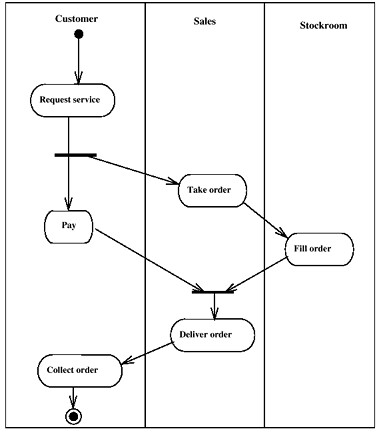
Activity Diagrams are used to design complex methods. It describes phases or activities done by the computer or an user. They are also used to describe business processes in a single usage scenario. They look a lot like flowcharts, actually, activity diagram is an upgraded version of flowcharts. Take a look at this example:

swimlane-activity-diagram by jean-louis zimmermann, on Flickr

This example describe a generic shop process. As you can see some task are only for a specific agent and reading it is really simple if you already know flowcharts. The diagram starts from the top and tells perfectly who is doing what and what conditions need to be completed first to start doing it. Activity Diagrams is one of the most important because describe the task of the program while being used by the consumer in a really simple way. Also, it is not only used on Software Engineering, it is important in business to analyze the interaction between the whole process of delivering a service.


Class Diagram

This diagram is used to represent classes and their relationship. They’re represented by using boxes and arrows. Each of the boxes represents a class and the stuff inside it. Most of the time they are broken into three parts: class name, attributes, and methods. Agile Modeling mentions that using this structure means making a design decision and should be avoided if one is only looking for a conceptual model of the class. The arrows are used to represent inheritance and other relationships between classes. Here is an example of a simple class diagram:
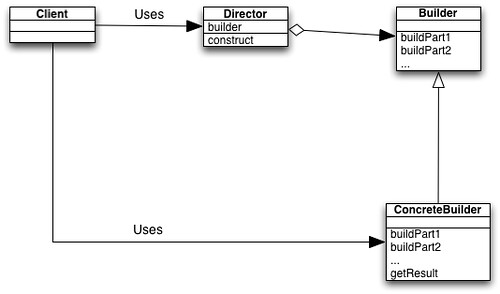
 

Class Diagram: Builder Pattern by beatak, on Flickr

Connections between classes may have tags that further explain how the objects will communicate. Some phrases to describe relationships are: lives at, enrolled in, instructs, and on waiting list. These relationships can also contain numbers that specify the amount of objects on each part of the relationship. One Object may hold many instances of another class while those hold even more objects. These numbers help control interactions and how often they should happen.
Class diagrams are among the most popular in UML thanks to the popularity of Object Oriented Programming. It also helps that OOP can be represented in a very understandable and simple way. UML lets developers communicate what a class will do.


Sequence Diagram

According to Donald Bell in an article for IBM developerWorks, this diagram is used to show in sequential order the interactions between two objects. This diagram is also called event diagrams or event scenarios. The main purpose of a sequence diagram is to define how related event sequences should result in a desired outcome, it models in a graphic way the flow logic of a system and it’s typically used to model usage scenarios and the logic of methods or services.
This kind of diagram is important because it shows the interaction logic between the the objects in the system in the time order that the interactions occur, which makes it specially useful to use to document a system’s requirements and design and it allows people to document and validate their logic.
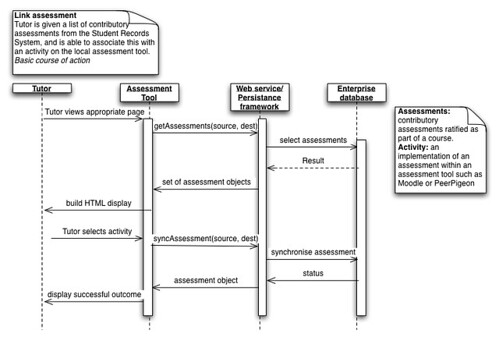
 

Sequence diagram for synchronisation of by carol shergold, on Flickr

UML is not a development method, but from there you can create oriented object software with any language that support oriented object programming, just like if they were instructions of how to do something, and the language you use, is the tool to create it.

Wrote by me and:

Waterfall Method

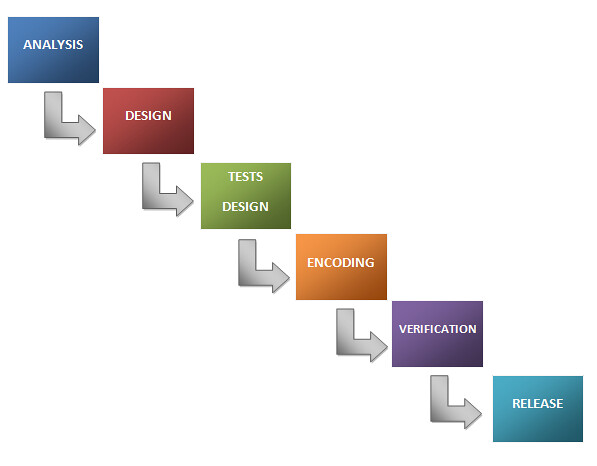
This was the first process model to be introduced, it describes a development method that is linear and sequential. In the waterfall method all the steps are defined in the beginning and once a phase is completed there’s no way back.


Advantages of the waterfall method:

  • This model is simple and easy to understand and use.
  • It is easy to manage due to the rigidity of the model – each phase has specific deliverables and a review process.
  • In this model phases are processed and completed one at a time. Phases do not overlap.
  • Waterfall model works well for smaller projects where requirements are very well understood.


Disadvantages of the waterfall method:

  • Once an application is in the testing stage, it is very difficult to go back and change something that was not well-thought out in the concept stage.
  • No working software is produced until late during the life cycle.
  • High amounts of risk and uncertainty.
  • Not a good model for complex and object-oriented projects.
  • Poor model for long and ongoing projects.
  • Not suitable for the projects where requirements are at a moderate to high risk of changing.

I found a really nice video that explains the waterfall methodology in only two minutes.